-
CORE FRAMEWORK
FEATURED COMPONENTS
-
RESOURCES
-
LEARN ZK
RESOURCES


Sinclair Case Study
Sinclair is a software company supporting multi-industry enterprises with IT responsibilities to an oil & gas company, hotels, ski resorts and a large cattle ranching operation
“ZK is a deceptively simple, and yet complex framework”
Part I: The Beginning
A Developer's Diary by Ron Grimes of Sinclair
Over the past dozen years, Sinclair's journey through the world of web applications has taken a few evolutionary steps, most of which were forced upon us by unforeseen events, as diverse as 3rd party tools being end-of-life'd, new standards and regulations, better frameworks emerging, and new browser releases introducing compatibility issues.
During this same period, web applications have been seen increasingly, by predators, as the gateway to attack corporations and their customers' identity and assets. This, in turn, has forced the web application developer to tighten the security and sophistication of those corporate services that are exposed to the world.
To further complicate the situation, it quickly became unsatisfactory for a web application to consist of a simple, plain looking form that accommodated CRUD operations. The user quickly began to expect web applications to look and perform as elegantly as their desktop or client-server counterparts. In fact, in some respects, it had to have an even greater level of sophistication, providing a cohesive and coherent integration of data, taken from disparate systems, and presenting it as a single, seamless interface known as the modern dashboard application.
For many corporations, they see web applications as a nice-to-have service, rather than what it truly is: the face of the corporation. It is the sole form of interaction that thousands, if not millions, of customers will have with them on any given day. In these cases, as far as the customer is concerned, the web application IS the corporation because it is the only vehicle through which the company is experienced. The impression that the web application makes upon the customer is the impression they have of the company on that day.
As each year progressed, new demands were created for the web application developer. Because the requirements grew over time, the demands of the position crept in upon us, creating more and more expectations upon both our professional and personal time. Had the modern day requirements of a web application been present from day one, it would have been easier to justify the size of staff that was needed in the days of client-server development. But, since web applications evolved in complexity over a period of several years, it was just expected that the developer would pick up these additional skills. And soon, we were all wearing six or seven hats. Be a front-end UX and UI expert! Be a middleware expert! Be a database expert, taking tables designed for old school procedural programs and make them work in an object-oriented world! Try to develop a bit of graphic artist skill! Can't you learn Photoshop and Illustrator in your spare time? Be a QA expert! Then, implement it, support it, and … oh, hell … no, I don't have time to document it too!
I have gone through this Cliff notes history, of what I am sure is a common story amongst many web application developers, in order to explain, if not justify, the path I have taken in choosing the technologies I have, for our web stack, over the years.
When I came to Sinclair in April of 2000, the process of turning the desktop around to face the world had already begun via CGI type programming. It was quite cumbersome, and definitely violated the concept of a loosely coupled architecture. My initial charge was to create a better layer of separation between data and UI design.
From Adobe Flex to ZK
I won't bore you with each evolutionary step that we took, and why, but will instead focus on our transition from Adobe Flex, which we had adopted in 2006, to ZK framework in 2011. Prior to 2006, and subsequent to our CGI days, we primarily used DHTML pages that were pushed out as the result of server-side transformation, which married XSL documents with resultant web service SOAP envelopes.
“Doing as much with as little as possible is our de facto motto. And, ZK has become a critical centrepiece of that strategy”
In 2006, there were no mature JavaScript frameworks to insulate developers from the travails of the infamous cross-browser hell. Consequently, it seemed to me, the best way to indemnify ourselves against browser inconsistencies, and truly achieve a write-once, run-anywhere world was to take advantage of Adobe's AVM, as embodied by the Flash Player. The decision seemed logically sound, since it was the most ubiquitous technology for insulating the developer against browser inconsistencies. It also had the advantage of making the UI look great with their out-of-the-box component set. As any web developer will tell you, it can easily take longer to get the UX and UI right than it takes to build the middleware services and backend database tables and triggers. If Adobe could help me out on that end of things, I was all for it.
That was how we did things from 2006 thru 2011: Flex on the client-side, Spring/CXF web services in the middle, and connecting to a variety of databases on the backend. Then came the Fall of 2011, when Adobe announced that they would be kicking the Flex SDK out the door to go live with the neighbor, as an ASF incubator project, while they would retain FlashBuilder (the IDE for developing Flex applications) in-house and refocusing it toward their new goals. It was clear to me that the writing was on the wall, in spite of Adobe's promise to continue to support the Flex SDK, via their Flash Player, for at least the next five years.
So, we were once again sent scrambling to replace that piece of the architectural puzzle. There are a ton of options out there, to say the least. Choosing one is a nightmare because you're almost assured that, no matter which fork in the road you choose, someone is going dynamite the road out from underneath you once you get too far down that road to turn back. It had happened before with a Novell product, and now it was happening with an Adobe product. So, clearly, the wisdom of choosing a solution, from one of the top 100 software companies in the world, as a safeguard against a piece of one's technology stack being obsolesced, was not a reliable strategy.
It was this realization that opened me up to considering a solution from half way around the world, and from a company I had never heard of. I had concluded that their product was just as likely, if not more likely, to have a longer shelf life than the solutions I had previously purchased from world renowned companies. My rationale was that it was more likely that a company with a single product, upon which their company relied for profitability, was far more likely to make sure it remained viable than would a company like Adobe, who would have no compunction against giving the axe to an unprofitable product that was but one out of their legions.
“With ZK, the heart of the web application could all reside on the server, without being exposed to would-be hackers”
Why ZK
It was at this time, during my search through a plethora of frameworks, that I stumbled upon ZK. I was immediately impressed with the component set, which was even more ample than those that came packaged with FlashBuilder. As I continued to read about this framework, I was further sold on the Server+client fusion architecture, partly facilitated by the jQuery framework. The fact that the client was pushed out, from the server, as an HTML5/jQuery solution impressed me even more, as it was clear that most of the directional arrows in the road were pointing to HTML5 as the future of enterprise web application development. With HTML5 at the heart of ZK's client-side solution, it was a given that it would lend itself nicely to being more device agnostic, since mobile and tablet apps were also moving toward its support.
With ZK, the heart of the web application (e.g., the business logic layer) could all reside on the server, without being exposed to would-be hackers. This was definitely a plus for the security considerations. It also leant itself more easily to maintaining state for any given user session.
The move to ZK also caused me to re-examine how we were doing middleware, which, up to this time, had been exclusively through web services (e.g., SOAP envelopes). It no longer made sense, in our environment, to use such a burdensome mechanism for communicating between client and services. Eliminating the marshalling and un-marshalling of SOAP envelopes would greatly increase response time back to the client, and reduce load on the server.
ZK is a deceptively simple, and yet complex framework. Initially, it's easy to think how fast it is it put together a sophisticated web application. And, that is truly the genius of the frameworks design. A ZK neophyte can quickly slap something together. But, the longer you work with the framework, the more depth you find it to have, making its possibilities only limited by your own imagination. Consequently, you begin to see how you can refine things to take advantage of its unique “Web Technology Synergy” that allows integration with JSP, CDI, Spring, Grails, Python, Scala, Groovy, or a couple dozen other options.
One way to illustrate its deceptive simplicity is in how ZK UI objects are created. I would imagine that most beginners create all page objects, from the ZK Palette, as UI objects, which consists of two parts: a client-side widget (the face of the UI object) and its counterpart on the server-side, a Java component (the brains of the UI object). You get this built-in complexity by the simple act of dragging a component from the ZK Palette to your ZUL web page. While this will work fine, it can create unnecessary server-side components, where there is no need for such symmetry. In such cases, one can create native XHTML tags within the ZUL (ZK's dialect of Mozilla's XUL). In this way, a Java server-side component is not created as its counterpart. This is just one small example, but indicates the type of refinements that can be made as one delves further into the ZK framework.
Sinclair x ZK
Our small shop has been working with ZK for over a year now. In fact, to describe us as a “small” shop is an understatement. We are a one senior and one junior developer team, writing and maintaining web applications for a multi-industry enterprise with IT responsibilities to an oil & gas company, several hotels, two ski resorts, and a large cattle ranching operation. Needless to say, doing as much with as little as possible is our small group's de facto motto. And, ZK framework has become a critical centerpiece of that strategy.
View Part 2 of this case study to read about “The Project”.
Part II: The Project — Sinclair Distributor Services Web App
A Developer's Diary by Ron Grimes of Sinclair, Part 2
The Distributor Services web application is designed to meet the needs of the wholesale customers of Sinclair Oil Corporation. This is where hundreds of users come daily to view their Sinclair Oil related business documents, which includes invoices, draft notices, credit memos, chargebacks, adjustments, fuel price history, along with several other business critical reports and features.
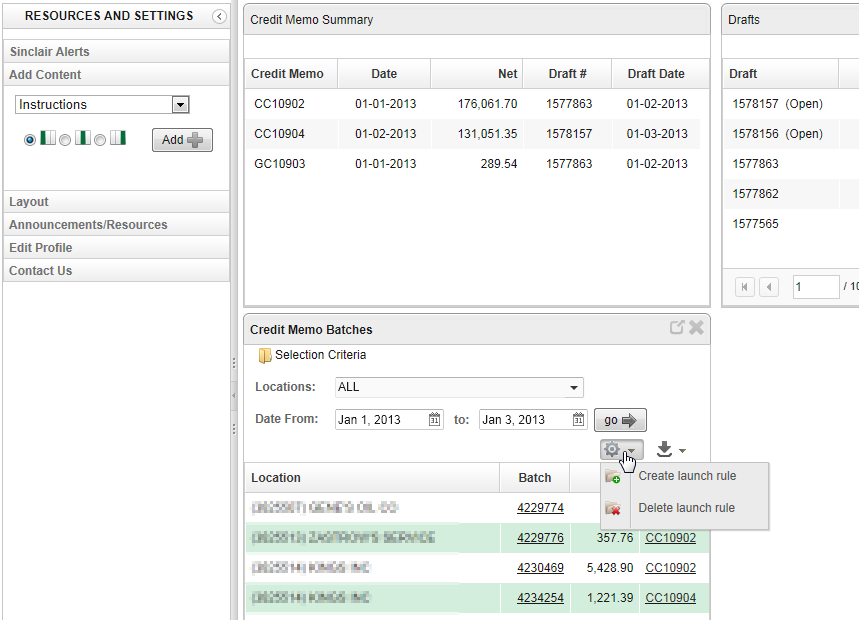
This project was designed as a business portal layout due to how it lends itself to user-specific content. For each distributor, we initially assign a single administrator login, who then may in turn define as many users as s/he likes for their business. The administrator may give such users as much, or as little, authority to view business documents as the administrator sees fit. This authority can be limited by document type (e.g., invoices, price history, credit memos) and it can also be limited to a list of authorized locations (e.g., fuel stations). This authority definition, at the user level, determines which portlets each user may add to their portal. This design also allows each portlet to be “maximized” to take up the entire portlet area, and thereby allowing for easier navigation of the data.
The individual user has the flexibility to define, from the 'Add Content' panel, which of their authorized portlets will actually appear upon each login. When a portlet is initially added to the layout, the user may define the column where it will appear. S/he may also move the portlets around, via drag and drop, and the application will remember the user's choice of column and row for each portlet so that it appears in the same order the next time they log in.
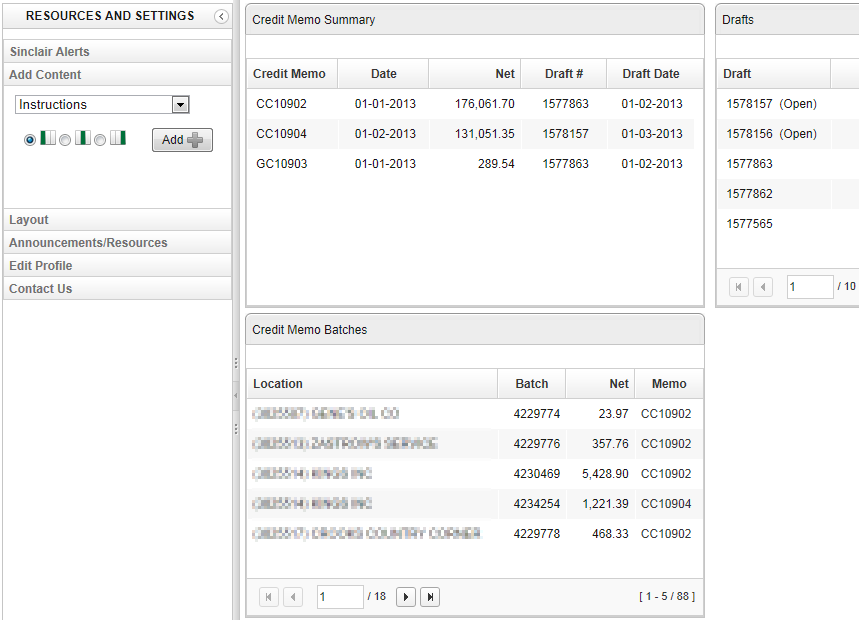
The design is deliberately a muted color theme, with only the focused portlet (determined by mouseover) coming to “life” with a more colorful theme, along with the appearance of buttons, links and a 'Selection Criteria' section that are not activated on non-focused portlets. This keeps the screen from appearing too busy where everything is demanding the users' attention at once.
Not only may the user define which portlets are automatically shown upon login, but which set of data is pre-loaded for each portlet. This is accomplished by letting the user define a “launch rule”. To illustrate, assume today is Jan 3, 2013 and the user selects “ALL” authorized locations and a date range of Jan 1, 2013 thru Jan 3, 2013. The user may then use these selection criteria as the basis to create an automatic launch rule for the given portlet. In this case, the rule would be, “Upon login, automatically show me all credit memo batches, for ALL authorized locations, for 2 days ago through today.”
The application is designed to store a different launch rule for each portlet, further increasing the user's productivity as s/he visits the Sinclair portal.
Every portlet, and every pop-up detail window, has the option to export the displayed data as a delimited file, PDF document, or Excel spreadsheet.
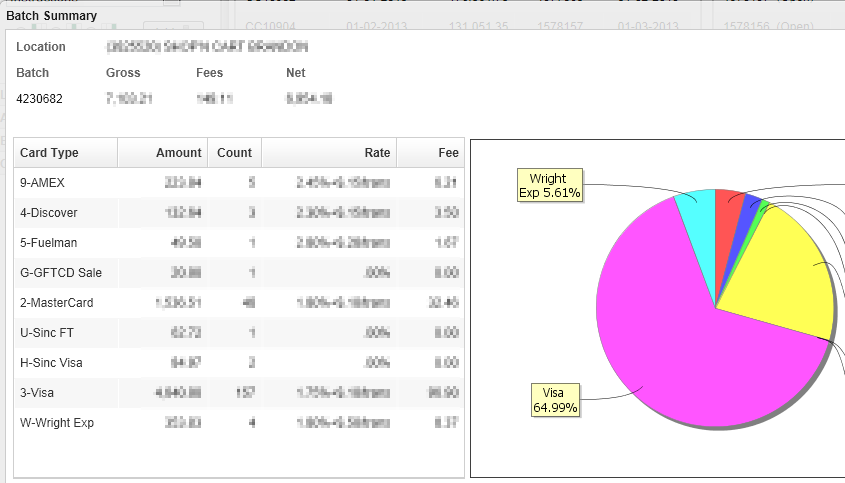
Most portlets also have the ability built-in to drill down, or up. For example, the following “Batch Summary” appears, as a pop-up, when the user clicks batch number 4230682 within the “Credit Memo Batches” portlet.
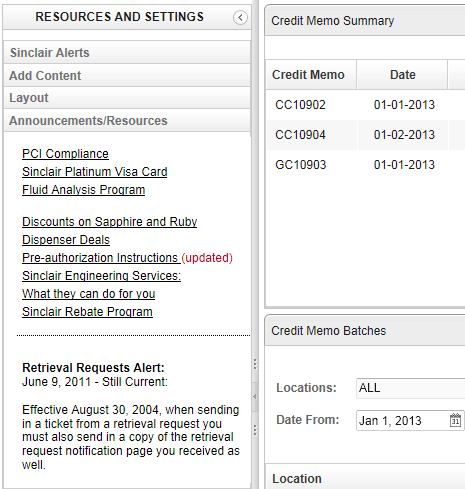
The application also allows for a one-way communication mechanism from Sinclair Oil to its wholesale customers. This is accomplished through two non-removable panels, within the left sidebar.
First, is the “Announcements/Resources” panel, which provides links to resources and announcements that Sinclair wants available to the customer for a longer term.
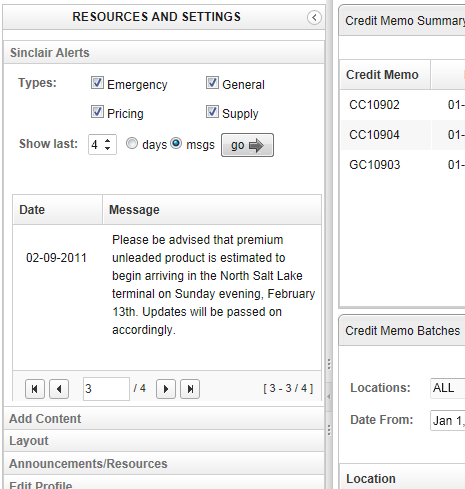
Second, is our “Sinclair Alerts” panel, where we can immediately push messages out to a single customer or a group of customers. The alerts are of four types: Emergency, General Info, Pricing Changes, and Supply issues, and are intended to be of a shorter life, having a 5 day lifespan and availability.
Summary
It has been our goal to provide to our wholesale customers with on-demand business documents, as well as real time communications that might impact the distributor's business planning and operations. This has provided an element of efficiency on both ends. Sinclair no longer has to pull physical documents that the distributor may have lost and needs another copy of it; thus consuming Sinclair's internal staffing resources. And, due to the applications' capacity to allow a user to define his/her own portal content, along with automatic pre-loading of relevant data, the time they have to spend retrieving information for their balancing, reconciliation, and other processes, is greatly reduced.
In addition, the business portal layout design, more effectively accommodates both desktop and tablet devices. This represents the second generation of the Distributor Services web application. The first iteration was written nearly 10 years ago as a DHTML/J2EE application that was really only designed to work with Internet Explorer, since the audience was limited and Internet Explorer owned a browser market share in the mid-90 percentile. So, at the time, for a one person web application developer shop, it seemed like a good economy of resources. But, over the years, that design decision has created its share of problems with the advent of Firefox and the rather recent demand that web applications be responsively designed.
The ZK framework now provides cover for the developer in multiple ways through its responsive design built into version 6.5 and its HTML5/jQuery solution on the client-side.